One of my tasks for this month’s Household Organization Diet was to review our family binder {you can find the full to do list HERE}. I haven’t actually done this for a while and found out that there were a lot of pages that I was not really using and others that were just not working well anymore. I decided that it was time to start fresh and set out to create some new printables that would better suit our needs. As with most of my projects, I am finding that this task is taking me much longer than I originally expected, but I know that it will be worth it in the end. One of the pluses with me taking so long is that it gives me lots of time to get each section organized as I go. You always have to look for the positive, right? 😉
Last week I talked about how to tackle the paper clutter, and today we are going to be focusing more specifically on how to organize bills. Unfortunately we all have them, and unless you come up with a good system to organize everything, you can easily end up with late fees, bad credit reports, and increasing debt – not a good situation to be in. I use the financial section of our family binder the most, so I thought that this would be a good place to start when I was coming up with some new printables.
So are you ready to get organized with me? Here is your task for this week….
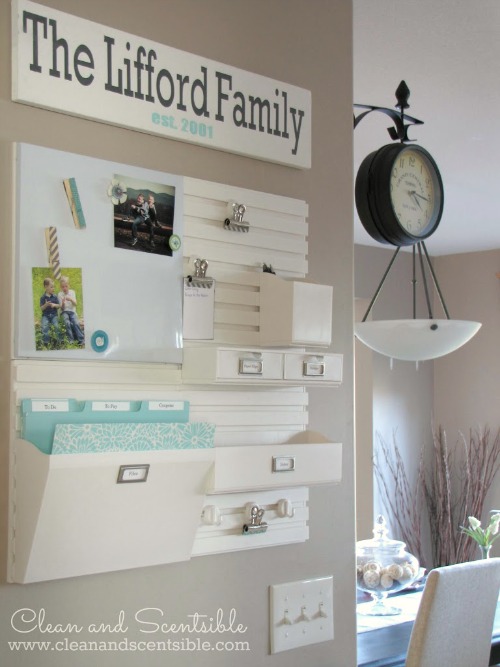
- Gather up all your bills and decide where you are going to keep them. If you are not going to keep them where you pay your bills make sure you store them in a portable file or basket so they are easy to transport. Throughout the week, I file mine away in our kitchen command center and then take them down to our home office area in the basement when I am ready to pay them. You can read more about my system HERE.
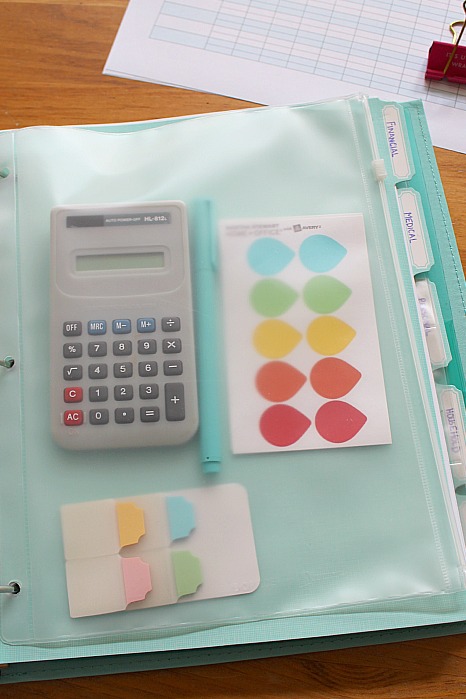
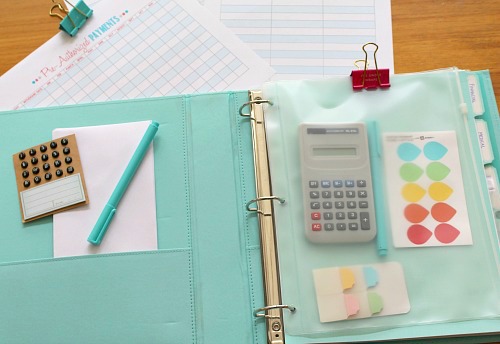
- Create a space that you will regularly pay your bills. If you don’t have a home office {or don’t particularly like yours!}, come up with another place in your home that will work. You will need to make sure that you will have access to a computer as well as a basic stock of home office supplies {pens, calulator, envelopes, stamps, etc.}. You can always place a zip envelope in your family planner to hold these items if needed.
- Schedule some time in your regular routine that you will consistently pay your bills. Once you get in the habit, it really doesn’t take long. I pay ours every Friday but you could set a schedule for every payday or other set time that works for you. If you are not paying your bills on a weekly basis, try to schedule in some time at least once per week to check your bank accounts.
How to Use the Printables
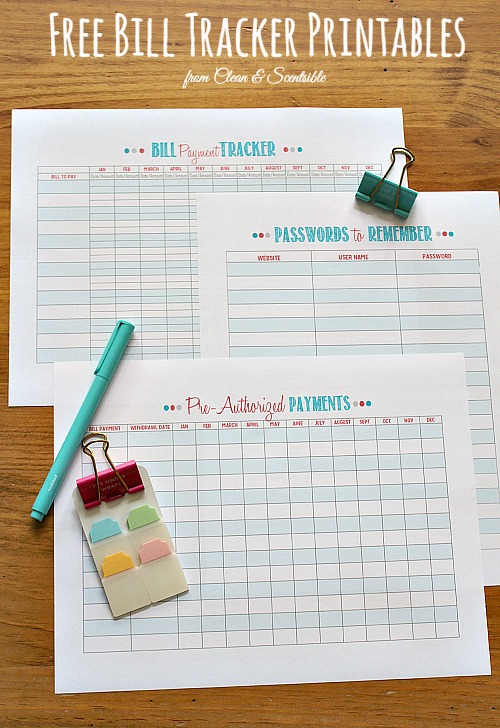
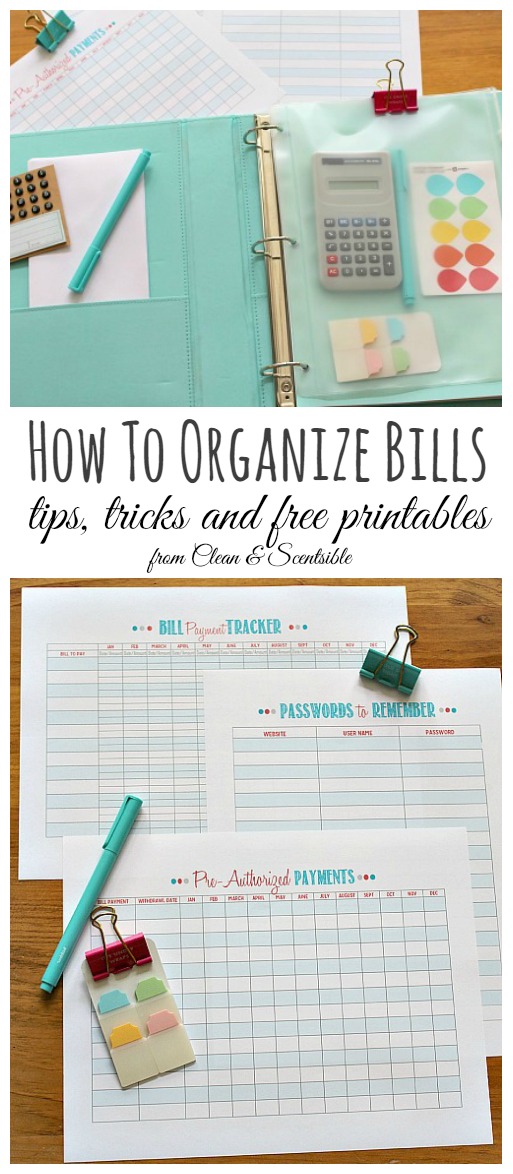
First you need to download the printables, save them to your computer, and then print them out. Depending on the number of monthly payments you have, you may need to print out two copies. PLEASE NOTE THAT THESE ARE FOR PERSONAL USE ONLY. Two of the printables have a horizontal orientation {landscape} so make sure you check your printer settings if it does not adjust automatically. The images below look a little fuzzy but they should print out clear. You can find all of the links here…
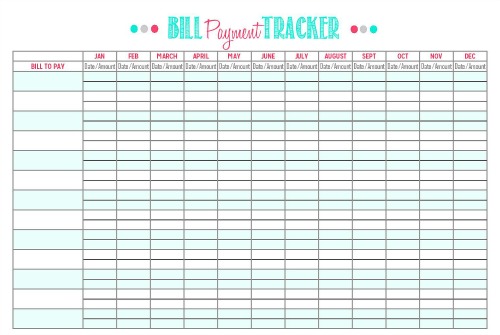
DOWNLOAD BILL PAYMENT TRACKER
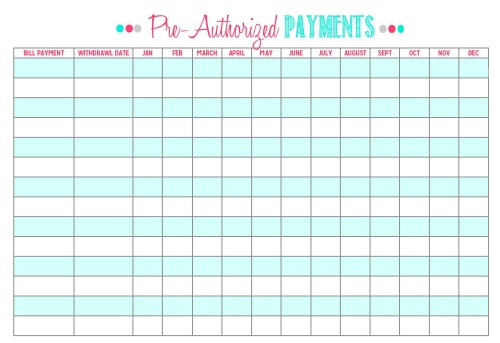
DOWNLOAD PRE-AUTHORIZED PAYMENTS
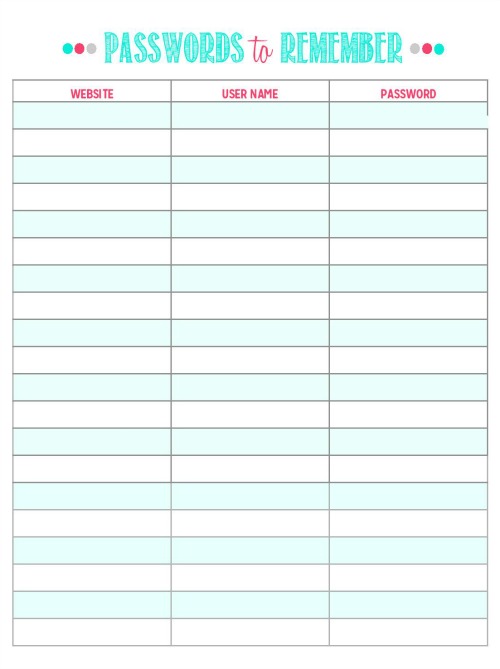
DOWNLOAD PASSWORDS TO REMEMBER
Next you need to go through all of your regular monthly bill payments. This will include anything from mortgage payments to utility payments to regular retirement or educational savings funds. {Remember that these are just for regular monthly bill payments – we will be doing some budgeting worksheets for other monthly expenses next week.} I find that the easiest way to do this is to go through my bank statement from the previous month and then write the payments {and due date if applicable} down on the appropriate sheets as I go. I promise that it really doesn’t take long at all.
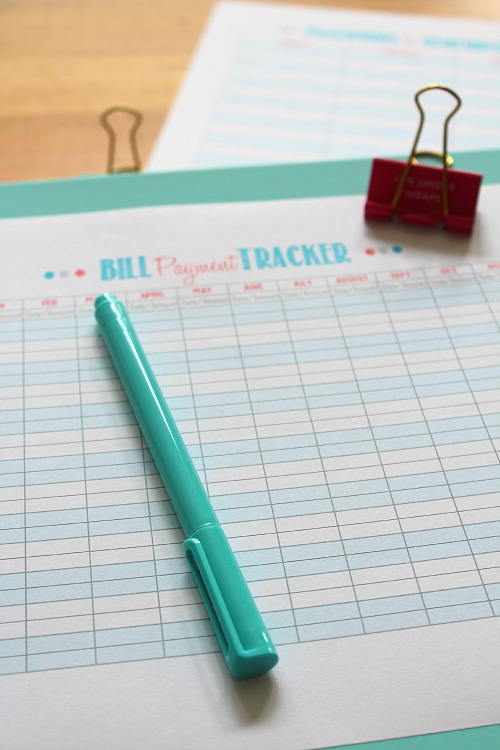
For the pre-authorized payment sheet, you just need to check off once the money has been withdrawn from your bank account each month. If you review you banking statements weekly, this is super easy to do. For the bill payments, write down the date you made your payment and the amount paid that month. Again, it only takes a couple of extra minutes to do and is so helpful to keep things on track!
If you receive a lot of online bill statements, having a password checklist is a must! As you check and pay your bills throughout the month, write in your information on the Passwords to Remember sheet. Even if you can remember your passwords {and you must definitely have a better memory than I do!}, it provides a place that your significant other can have access to the sites as well. It’s never pleasant to plan for accidents, but they can happen!
Tips to Keep Your Bill Payments on Track
- For regular bill payments of a set value, look into setting up automatic bill payments through your bank. It’s just one less bill that you need to remember to pay!
- To reduce paper, pay your bills online and request that your bank does not send you paper statements. You can always print them out from home if they are needed for something. View your statements online regularly to ensure that all transactions are legitimate and to ensure that you are staying on track for your monthly spending.
- Have a paper shredder close by so you can shred your bills immediately after paying them. If you do need to keep them for tax reasons or other purposes, write the amount that you paid on your bill {or paid in full} and file them away.
- Most companies now have an online billing system, so you can view {and print if necessary} your bill statement from online. Again this will significantly cut down on your paperwork. If you tend to receive your bills through email, create a folder in your email system specifically for Bills to Pay and Bills Paid. As soon as you receive the email, place it into the Bills to Pay and then move it to the Bills Paid once you have paid it. Again, this will significantly cut down on your paperwork while still making all of your bills easily accessible to you.
- Be sure to schedule a specific time each week to sit down and review your banking statements and pay bills. 15-30 minutes once per week should do it!
 So let’s get organizing those bills! Next Monday we will be putting our family binders together and will be working on the budget!
For more tips on organizing paperwork, check out these posts…
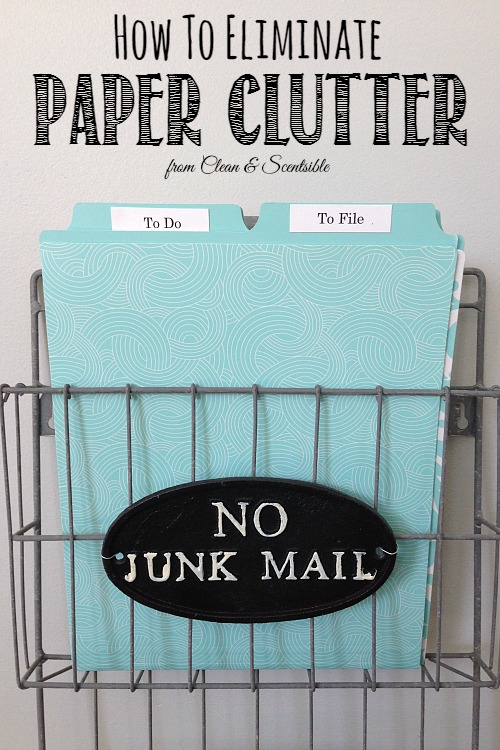
How to Organize Paperwork – Creating a Paper Trail

The March Household Organization Diet – Organizing the Home Office
*********************
This post is part of The Household Organization Diet. If you need some organization inspiration, check out THIS POST to learn more about the plan and THIS POST for all of the 2015 updates. You CAN get that house cleaned and organized once and for all! To see all of the previous posts click the Get Organized tab at the top of the blog and go to The Household Organization Diet. I also have all of the posts pinned to my Household Organization Diet pinterest board. Start at any time and make sure you are following along so you don’t miss out…
INSTAGRAM / FACEBOOK / PINTEREST / NEWSLETTER
Thanks for these! I’ve been working on ways to keep better track of our finances, and these will be helpful. However, the link for the pre-authorized payment form takes you to the password form instead…
You are inspiring me to get more organized. I’ve been working on cleaning up the disaster that is our office space, but was derailed by sick kiddos. Hopefully I’ll be able to get back to it this week…
Sorry – just fixing the link now. Hope they are helpful! 🙂
thanks for the printables. the link for the preauthorized payments is incorrect. its for the passwords. :o)
Thanks! Just correcting that now! 🙂
thanks! got it now~
Love your site!
Thanks Heather! 🙂
Great ideas and Printables. Thank you very much for joining in the celebration of #purebloglove, we enjoy having you each week. I hope to see you on Thursday at 8PM, EST through Sunday night. ~Cydnee
Such a great idea, Jenn! I love your family’s organizational system, too. I am too scattered brain to even come up with ideas like these:) Thanks for sharing with us at Home Matters linky party. We hope you will join us again at this Friday. Feel free to bring a friend!! Pinning!!
Thanks so much and thank-you for hosting!
Wonderful ideas! Your sight is a big help since I strugle to keep on track and organized. Your ideas and printouts make it fun and doable. Thank you so much,
So glad that you found it helpful! 🙂
Hi Jenn,
I just found your blog and I love it so far! This bill organizer is perfect! I have been looking for something like this, however the links dont seem to be working. I cant open any of them. I tried to open on Internet Explorer and Mozilla. Am I the only one having this issue?
Thank you,
Andrea
Hmmmm,generally Chrome works the best for opening up the downloads since they are on Google Docs; however, i just tried it on Exporer and Firefox on my computer and they are both working for me. I haven’t had any other complaints so I wonder if there is some anti-malware on your computer that is preventing them from opening? Could you change your settings?
Hi Jenn! I was wondering where you found the cabinet with the secretary style fold-down desk on the bottom. I have a very awkward wall in my kitchen, and something like this would be perfect to put there to also stash away mail, and keep everything organized!
Sorry that I didn’t get back to you sooner on this! I love that secretary desk too but it is a feature from another site. Right underneath the photo there is a direct link to it – just click on there and there should be more information. Thanks for reading!
Great printables, wonderful ideas!
Thanks for joining the Small victories Sunday Linkup. Please join again. Pinned to ghe group board.
These are awesome ideas for organizing the paper clutter! Thank you for linking up at “A Little Bird Told Me” Wednesday link party. 🙂 You are featured on Mama’s Happy Hive blog this week!
Thanks so much Vanessa! Hope you have a great week!
What a great post! Thank you so much for sharing the lovely printables!
Hope you find them helpful. Thanks for stopping by!
Thank you for the free printables.
You’re welcome! 🙂
I love love love your organization space on the wall!! If it’s possible, could you tell me how you made it and where you got the products to make it? Plus the overall cost? I love your organization advice! Thank you!
It is from the Martha Stewart line at Staples but sadly they have discontinued the whole line. 🙁 If you search Martha Stewart wall organization system on ebay, they may still have products on there. I just picked up some of the adhesive bookplates from the same line the other day from there.
I am unable to open the tracker for PAP and MNTHLY bills 🙁
Usually it is an issue with your browser or your personal security settings if you are having difficulty downloading. Try taking off the security blocking before trying to download and Google Chrome usually works best for a browser (Internet Explorer tends to be the worst!). Hope that helps!
Just wanted to let you know how useful the bill payment tracker was this year. We are adjusting our budget to reflect recent financial changes and it was great to be able to see how much we have spent on bills and utilities throughout the year. I have just printed and customized my copy for 2016.
Thanks again for a great tool!
So glad that it was helpful for you! Thanks so much for letting me know!
Hi!
I really appreciate that these are all free downloads!!! It’s so kind of you to take the time to make these and post these online for people to use. I’m 22 and I work two jobs and go to school. I’m really bad with money but I am going to get on track this year. And with your printables I am so excited to start!
Thanks again!
Good for you for starting young! I’m sure your hard work will pay off!
I love love the way the debt tracker is laid out, no interest rate box, Eric, however the word Amount is spelled wrong! Other than that, love it.
Thanks! I was confused for a minute as that printable is actually in another post, but I did realize that after I had posted. 🙂
These are so helpful. And pretty, too! Thanks so much for sharing.:)
Hope they help!
Thank you so much for the printable and tips. I have my passwords written on a piece of paper that looks more like scrap paper now and it really needs better organization and updating. As I type this, I am locked out of my online mortgage site because I entered the wrong password too many times. Have to call them this AM. Really appreciate your willingness to share.
Hope you got your password back! I hope the printable helps!
Great post! Loving the photos as well (photo envy!) Your post was so good I’ve linked to it as part of a resource post. Keep up the good work!
Thanks so much!
I love you family organiser! Also where did you get that turquoise binder from? I love it. Your post is very helpful.
It’s from the Martha Stewart line at Staples. It was discontinued for a while but it is now back in stock {I think online only} in the States only.
Hi Jenn,
These are great, but are they for printing only? I”d love to just keep it all on my computer instead of printing it out.
Thanks
F
Yes, sorry. They are for printing only.
I’m new to your site, and I’m loving all the tips and ideas! One question, do you have a post or more information about how you organize and divide you binder pictured in the post about organizing bills & bill payment tracker?
Thanks!
I actually don’t have a post on putting it all together because I always seem to be tweaking it. I think I finally have things arranged now though so I should get around to sharing. Stay tuned!
how about a mom, event planner and husband company, sometimes I forgot to sent Invoices or Estimates. How to keep the records who paid or not. Can you help me to make a sheet to keep the records .
I don’t have a list for that one but you can always customize one for yourself. Just write down all your monthly tasks or what records you want to keep. Excel is quite easy to use if you want it on the computer, but you can easily just draw one up and photocopy it as well. The simpler the better!
Thanks for these! I love the bill tracker and wanted to use it to also track my monthly spending, but it won’t load so I can download/print!
Try switching browsers. For some reason, Chrome works best and Google Docs really doesn’t like Internet Explorer. Just let me know if that doesn’t work. Thanks!
Keeping track of my finances is a huge goal for me this year so I will definitely be printing these off. I will also create an expenditure sheet to keep track of every penny.
Great post thanks for the inspo :
Foirell
I’m so loving the binder idea! I have so many things in binders, but never put bills in a binder… so clever and love the printables! Happy New Year!
Yep! I’m a binder girl too! 😉
Organizing can be such a struggle. Thanks for the tips! And thank you for sharing this at Dishing It & Digging It! I look forward to seeing more of your creativity this year. 🙂
Being organized with bill paying really does help save money! I finally got myself organized on YNAB. Thanks for linking up to #HomeMattersParty
Definitely! Glad you found a system that works for you!
These are great! Passwords have driven me to insanity 😉 Thanks for sharing with us at Funtastic Friday!
This is my third year using this bill tracker. I love it! Very useful for seeing which bills still need to be paid (not all of them are due on the same day) and for planning the following year (seasonal bills). I can also see which utilities have increased throughout the year.
Thanks for this great tool!
I’m so glad you’re using it! Thanks for letting me know! 🙂
Thank you! These are lovely.
You’re welcome! I hope they’re helpful for you!
Thanks for the helpful organization tips. Love the binder idea and your photos are great! Thanks for sharing!
Glad you found it helpful!
my life just got so much better with the big payer form! Thanks so much. I don’t know what to do with bills that are one time only? Any suggestions?
Thank you so much for sharing these forms 🙂
You’re welcome! I hope they’re helpful for you!
Love your printables! I just wish I could type on them like a pdf on my computer for neatness rather than have to write on them. It won’t let me do anything to them without buying into an acrobat PDF filler site. So cute though!
Glad you like them! Yes, these ones are just JPEGS so they aren’t editable. If you really want to have them typed, you can open them in a photo editing program (like PicMonkey) and just add the numbers in as text. It takes a little more fussing but not too bad!
Trying to DOWNLOAD PASSWORDS TO REMEMBER but I get an error that says that the file was trashed by the owner. Can you help, please.
Thanks,
Jerry
Hmmm… the link works on my end and I definitely didn’t trash it. If you aren’t using Chrome for your browser, that would be the first thing to try. It’s saved in Google Drive which doesn’t always cooperate with other browsers. Otherwise, the only other thing I can think of is to try and adjust the security settings on your computer (and use a desktop computer – not a tablet, ipad, etc.). Hope that helps!
Thanks. I’ll give it a try.
Hi I just came across this awesome idea thru Pinterest. Can you please tell me where I can find this cute small dividers that you have in this post please !
Thanks! It’s all from the Martha Stewart collection with Avery at Staples. It’s from a few years ago so I’m not sure if they still have everything in stock. They usually have a lot more options on-line than in store {and I’m not sure where you’re from, but currently, I think it’s only on the US – not Canadian – website}.
Hi Jenn,
Thanks for your ideas and resources. I’ve been using your Bill Payment Tracker for over two years now and I haven’t been able to find a better template. I have tons of bills to track for my family and this has been a lifesaver. Thank you!
I’m so glad to hear that you use it! Thanks for letting me know! xo
These are great! I wish I could find a cover sheet that matches.
A cover page would be pretty easy to design in PicMonkey or something similar. You could color match to the ones on the tracker and then add your family name or whatever other customization you would like.
I am in love with your bill payment tracker! The colorful print makes me actually happy to pay all of my bills!!!!! Could you make one with the same awesome print and layout but add a box for confirmation numbers? I do all of my bill paying via phone and I don’t have anywhere to write down my confirmation number!
Glad you like them! I can’t change this printable, but will definitely keep that in mind when I create a new one. I’m hoping to do an updated version in the next couple of months.
Thank you so much for the Passwords to Remember. Exactly what I was looking for.
Glad it’s helpful!
Just found this page. Printed out all the tools. Thank you for giving me a start to managing my finances.
Glad you found it helpful!
Sincerest thanks for the printable Bill Payment Tracker, Pre-Authorized Payments, and Passwords to Remember pages, which I have printed out. The forms have also been downloaded into my computer. Question: I would prefer to insert the info to the forms on my computer rather than by hand on the printed pages. If this is possible, how is it done?
There are a JPEG format, so you can open in any photo editing program and just add the text overlay. Alternatively, you may be able to covert to a fillable PDF file. I know you can do a regular PDF, just not sure if you can make them editable. Glad you could use the forms!
I have been using your bill payment tracker since 2016. I absolutely love it! I have even started using it for my kids now that they have monthly bills. It makes bills to be paid so easy to see at a glance and truly helps me stay organized. Thank you for this wonderful tool! I am so happy I found you on Pinterest!
I’m so happy to hear that! It’s funny how just an extra minute or two of tracking can make such a big difference!
The “Passwords to Remember” link is not working.
When I click on it, it’s working so I’m not sure what’s going on. What happens when you click on it? (just make sure you’re clicking on the link BELOW the photo)
I am having the same issue. When I click the link, it says “No preview available. File is in owner’s trash.” I am using google chrome web browser.) I’d love to use the password tracker sheet, if I can get it printed out!
I have been using your bill payment tracker for 4 years and I absolutely love it! Thanks so much for providing so many cute and helpful organizational printables! <3
Thanks for the details. I think I have it figured out now. For some reason, google drive had moved it to the garbage bin (along with some other printables that I didn’t want deleted!!). Also, if you want this version, grab it now as I have a slightly updated design that will up in a couple of days.Glad you like them!
Thank you. It is now working for me.
I think I have it working now. Hopefully it works for you!
Thank you. It is working now.
Great!